How to Add an M3U Playlist on Android TV and Google TV
Add an M3U link or Xtream Codes login to a player on Android TV or Google TV, enter long links without the remote, and fix a list that loads no channels.
Getting your playlist onto an Android TV or Google TV takes two things: a player app on the TV, and your M3U link or Xtream Codes login inside that app. The TV itself has no playlist setting. The part where most people get stuck is the second one, because a playlist link can run to well over a hundred characters and the remote has four arrows and an OK button. This guide covers the whole path, including two ways to avoid typing with the remote at all.
Key Takeaways
- Android TV and Google TV run Android apps. You add a playlist inside a player app, not in the TV’s settings.
- Use what your provider gave you: an M3U link, or an Xtream Codes login (server, username, password).
- Don’t type long links on the remote. Type with your phone’s keyboard through Google’s remote app, or add the playlist from a browser if your player supports it.
- The first download of a large list can take a minute or two. Later opens are faster.
Step 1: Install a player
Google TV is the interface Google runs on top of Android TV, so the steps below are the same on both.
Open the Google Play Store on the TV and install a player that accepts M3U links or Xtream Codes logins.
If the player you want isn’t in the Play Store, you install it from its APK file. Kibo Player is one example: the Android TV version is the same APK as the phone version, and our download page explains the file. On a TV, that usually means installing a downloader or file manager app first, then allowing that app to install others. Since Android 8.0 there is no single “Allow unknown sources” switch: the Install unknown apps permission is given app by app (Android Developers, Android 8.0 behavior changes). Where it sits in the settings menu varies between TV brands.
Only install APK files from the developer’s own site.
Step 2: Choose M3U link or Xtream Codes
Players usually offer both when you add a playlist. Use whichever your provider sent:
- An M3U link is a single address. Sometimes it ends in
.m3uor.m3u8; often it looks likehttp://provider.example:8080/get.php?username=...&password=.... Our explanation of M3U and M3U8 shows what it contains. - An Xtream Codes login is three fields: server, username and password. If you have it, prefer it: the player gets live TV, movies and series as separate lists. Xtream Codes logins explained goes through each field.
A get.php link already contains an Xtream login, so if you only have the link, the username and password are written inside it.
Step 3: Enter it without fighting the remote
Typing a long address letter by letter on an on-screen keyboard is slow and easy to get wrong. Two better options:
Option A: Type with your phone’s keyboard
Google’s own remote apps let your phone type into the TV. Google’s help page Use your phone as the remote for your Chromecast or Google TV Streamer says you can “type on your TV with your phone’s keyboard”. On Android you use the Google TV app; on an iPhone with iOS 14 or later, the Google Home app. That page covers Chromecast with Google TV and the Google TV Streamer; TVs from other brands often have a remote app of their own that does the same.
With the phone keyboard you can paste the link you copied from your provider’s email, which removes typing mistakes entirely.
Option B: Add the playlist from a browser
Some players show a MAC address and a device key on the TV and let you manage that TV’s playlists from a website. You read the two values off the screen, sign in on the website from your computer or phone, paste the link there, and the app on the TV picks it up. Our app works this way: sign in on Manage playlists with the pair the TV shows, and the playlist reaches the TV within a minute while the app is open.
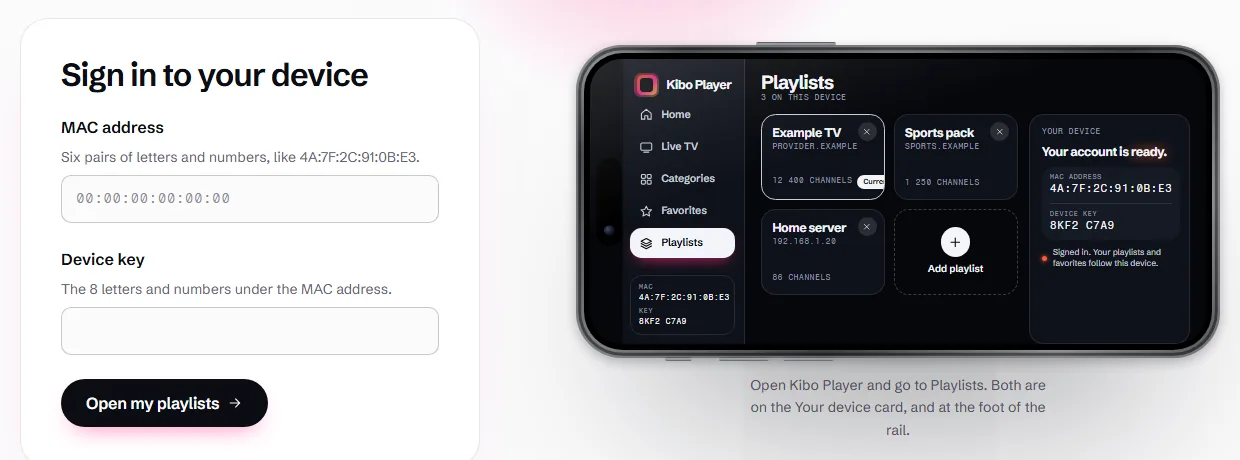
If you are wondering why a TV app shows a MAC address at all, MAC address and device key explains what the pair is and how to keep it safe.
Step 4: Let the list load
The first time a playlist opens, the player downloads the whole list. For a list with thousands of channels this can take a minute or two, and longer when the provider’s server builds the file at the moment you ask for it. Players that save channels as they arrive let you start watching before the download ends.
Leave the app open during that first load. Players that keep a saved copy of the list open it much faster after that, because they don’t download every channel again each time.
If no channels appear
Work down this list before reinstalling anything:
| What you see | Likely cause | What to do |
|---|---|---|
| An error as soon as you add it | A typo in the link or server | Paste it again from the provider’s message; check http:// and the port |
| The list loads, but it’s empty | Wrong password, expired account, or too many devices | Read the account status, as shown in Xtream Codes logins explained |
| Channels load, but some won’t start | That stream is down, or uses a format the device can’t play | Try the channel in your provider’s own app |
| Channels play, then stop to load | Network or server speed | Follow our buffering checklist |
| Names show strange characters | The list isn’t saved as UTF-8 | Ask your provider for a UTF-8 list |
Using the same playlist on your phone and TV
You can add one account to several devices; the playlist isn’t tied to the first one. What limits you is the provider: each account allows a number of simultaneous connections. If it allows one, watching on the TV while your phone is also playing will stop one of them. Check the limit before you set up a second screen.
The short version
Install a player, choose M3U link or Xtream Codes, and get the text in with your phone rather than the remote: through Google’s remote app, or through the player’s website if it has one. Give the first download time, and if the list comes back empty, read the account status before anything else.
Written by the team that builds Kibo Player. We fact-checked every linked source on 10 November 2026. If something here has changed, tell us, and you can read more about us.